At the counter, at the table or in the taxi: your customers scan a QR code and pay from their own banking app. No card terminal, no hardware rental, no waiting for payouts – the money is on your account before they walk out.
Firstguard gives taxi operators a payment solution without a card terminal in the car.
Passengers scan the code on the headrest and confirm in their banking app before the ride is over. Drivers spend less time on payments, passengers leave happier, and the money is on the operator's account before the next fare.
Restaurant
Put a QR code on the bill, the menu or the table. Guests pay from their seat, split the bill with friends and leave when they are ready.
No waiting for the terminal, no tip forgotten, and every table turns faster. Refunds and corrections are handled from your dashboard in seconds.
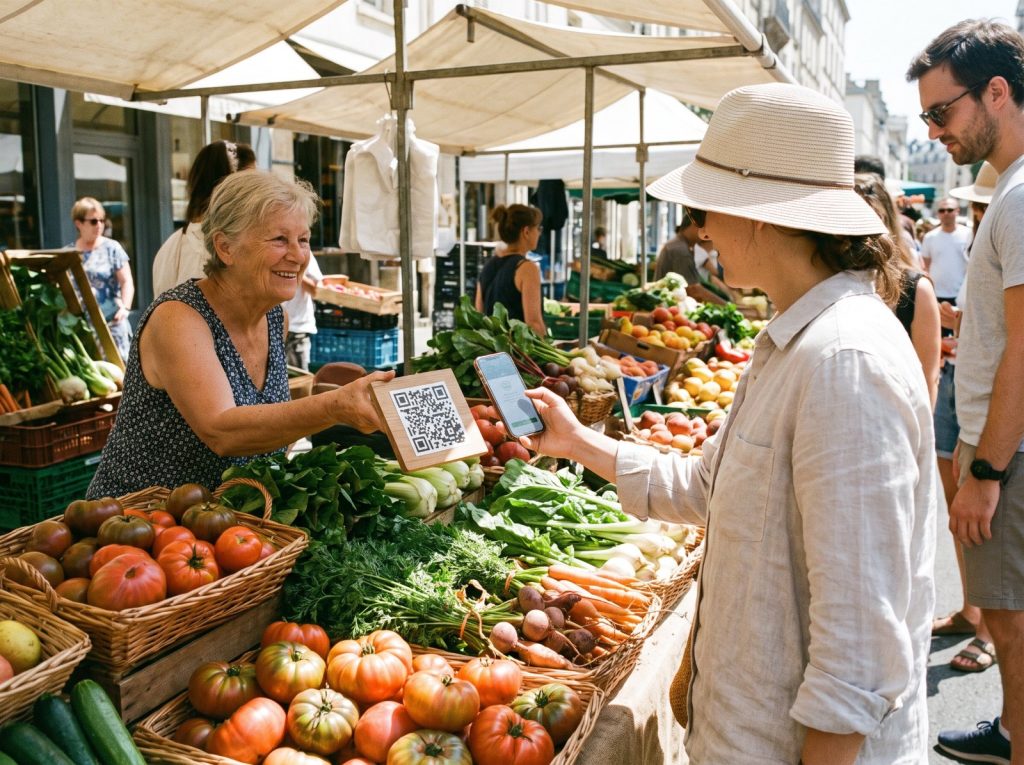
Street market
Sell at markets, festivals and pop-ups without renting hardware. A printed QR code and your phone are all you need.
Customers who no longer carry cash can still buy from you, and you avoid the fees a card reader would cost you per sale.
Accept QR-code payments in your shop
Whether you run a small shop or a chain of stores, we have a payment option that helps you sell more.
Start accepting payments with your personal QR code. Your free QR kit arrives after registration, so you are ready on day one:
Counter stand and table cards
Weatherproof stickers for windows, cars and stalls
Printable A4 sign and a digital code for your screens
Pick the one that fits your counter – or use both.
9:41●●●
Scan to pay
Point your banking app at the code
Open banking app
Printed QR code
Sticker, counter stand or sign
One fixed code for your business. The customer scans it, types the amount (or you set a fixed price) and confirms. Perfect for market stalls, taxis, tips and donations – it works even when your phone is in your pocket.
9:41●●●
Request payment
Amount€ 24.90
Show this code to your customer
QR code on your screen
Enter the amount, show the code
Type the amount in the Firstguard Business app or on a tablet at the counter. A QR code with the exact amount appears; the customer scans and confirms – nothing to type, no mistakes. Ideal for shops, restaurants, salons and cafés.
How it works at the counter
You show the QR code.
On the sticker or stand, or on your phone with the amount already filled in.
The customer scans it.
With the camera, their own banking app or the Firstguard app – no download needed.
They confirm in their banking app.
One tap with fingerprint or face ID. No card, no PIN pad, no cash.
You see "Paid" on your phone.
A notification with the customer's name and the amount, and the money is on your account in real time.
9:41●●●
Scan to pay
Point your banking app at the code
Open banking app
9:41●●●
Payment sent€ 48.00 · just now
Done
Made for every place where people pay in person
If your customers stand in front of you, a QR code is the fastest way to get paid.
Shops & retail
Show the amount on a tablet at the till; customers scan instead of inserting a card.
Restaurants & cafés
A code on the bill or the table. Guests pay from their seat and split the bill themselves.
Taxi & delivery
A sticker on the headrest or the delivery bag. No terminal in the car, no cash on board.
Markets & pop-ups
A printed sign is all you need. Sell to customers who no longer carry cash.
Hair & beauty
Let clients pay at the chair and add a tip in the same tap.
Services at home
Plumbers, cleaners and repair services get paid before they leave the door.
Events & festivals
Bars, food stands and merchandise without queues at the card reader.
Tips & donations
A code on the counter or the collection box – any amount, straight to your account.
Everything you need to manage your business in one app
Get paid faster with Firstguard. Your customers pay securely.
Manage all your bank accounts in the Firstguard app
Connect every business account to one platform and never lose track of your finances. Categorised transactions from all your banks appear on a single, clear dashboard.
Simple pricing. No surprises.
You pay one small fee per successful payment – and that's it. No setup costs, no monthly minimum, no fees for refunds or payouts. Every rate is on this page, so you always know what a sale actually earns you.
Raise your conversion by offering the payment method your customers already trust.
Optimise cost efficiency
Remove hidden charges and cut payment processing fees to a single flat rate.
Instant settlement
The money is on your account the moment the customer confirms – no waiting for payouts.
Refund
Handle payouts and full or partial refunds directly in your business dashboard.
Important notice & security tips
Important notice
Keep the app up to date. New features and security improvements arrive with every update – check your app store regularly.
Security tips
Turn on biometric login (fingerprint or face) and never share your login code. Our team will never ask for your password.
Compatible with the major mobile banking apps in the EU
Frequently asked questions
How can we help?
Click Register now on this website and complete the short registration form, or download the app and register there. After a quick verification you can accept payments straight away.
No. Your QR code works on a sticker, a sign or a screen. Customers scan it with their own phone; you only need the app to see incoming payments.
No. Any banking app or the phone camera can read the code. Customers who do have the Firstguard app pay even faster and collect cashback.
The printed QR code always works – the payment runs over the customer's phone. You only need a connection to see the confirmation in your app.
Yes. Invite team members with their own login and decide who may see reports, issue refunds or change settings.
Every payment is authorised inside the customer's own banking app with strong customer authentication. Your QR code contains no bank details that could be misused.
Each code is tied to your verified account and shows your business name in the app before the customer confirms. Report a suspicious sticker to us and we block it immediately.
In real time. The moment the customer confirms, the funds are transferred to your linked bank account.
One flat fee of 1% per successful transaction. No setup, monthly or refund fees.